Shein Free Trial Center Playbook: Get Picked More Often
Your full guide to the Shein Free Trial Center: applying, tracking results, sending reviews within 10 days and using the Rewrite option.
Advertisement
Free Trial Center Playbook: Ways to Boost Your Odds of Selection
Places are scarce, and the wrong approach can lead the system to pass over your profile. Walk through the proven steps below.
Advertisement
An Independent Guide for Readers This overview draws on publicly available details about the Shein Free Trial Center. We hold no commercial ties or official partnership with the brand. Choosing testers is a highly competitive affair, and final approval is never assured. Read the terms of each selection before you apply.
Why So Many Requests Get Turned Down
Each week, the distribution dashboard sorts through an enormous number of applications. Plenty of shoppers are left out because of unfinished profiles, late applications, shipping addresses that don't match the store's country, or thin reviews with no photos once their pieces arrive.
To give your profile more weight in the system, settle into a steady rhythm: fill in your personal details, apply the moment each window opens and offer rich reviews every time. Selection follows firm criteria.
The Sample Program Explained
Think of this space as Shein's official quality-control hub. Chosen members get pieces free of charge in return for a promise to write an honest review shaped by real use. When a request is approved, a free order is generated and dispatched automatically.
Places are few and refreshed all the time. Nobody is guaranteed entry; your overall activity, how promptly you apply and the quality of your earlier reviews shape your eligibility for upcoming campaigns.
Popular Categories You'll Find in the Catalog
The selection of pieces spans many corners of everyday shopping. Since stock is refreshed constantly, the catalog tends to mix the newest fashion trends with daily essentials waiting for testers.
Beyond clothing, the dashboard frequently features beauty and personal care finds, home accessories and contemporary decor.
Highlighted Categories on the Dashboard:
Step into the trial section
Sign in on the website or the mobile app and make your way to the trial section. On a phone, the usual route is: Profile → More Services → Other Services → Free Trial Center. Browse the pieces on offer this cycle.
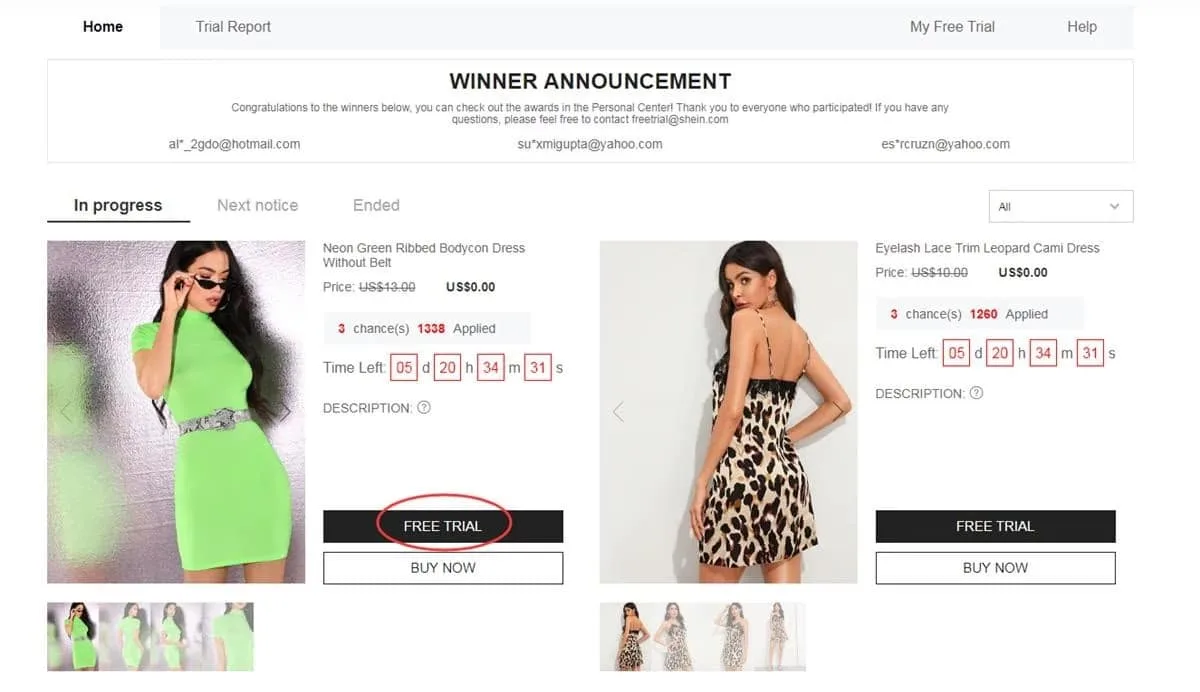
Official route within your account's services panel
Pick up to 3 pieces each week
There's a firm cap of 3 choices per week (spots you don't use are gone and never pile up). Tap the trial option, pick your correct size, confirm a shipping address inside the active store's country and send the form. An invalid shipping address means the request gets declined.
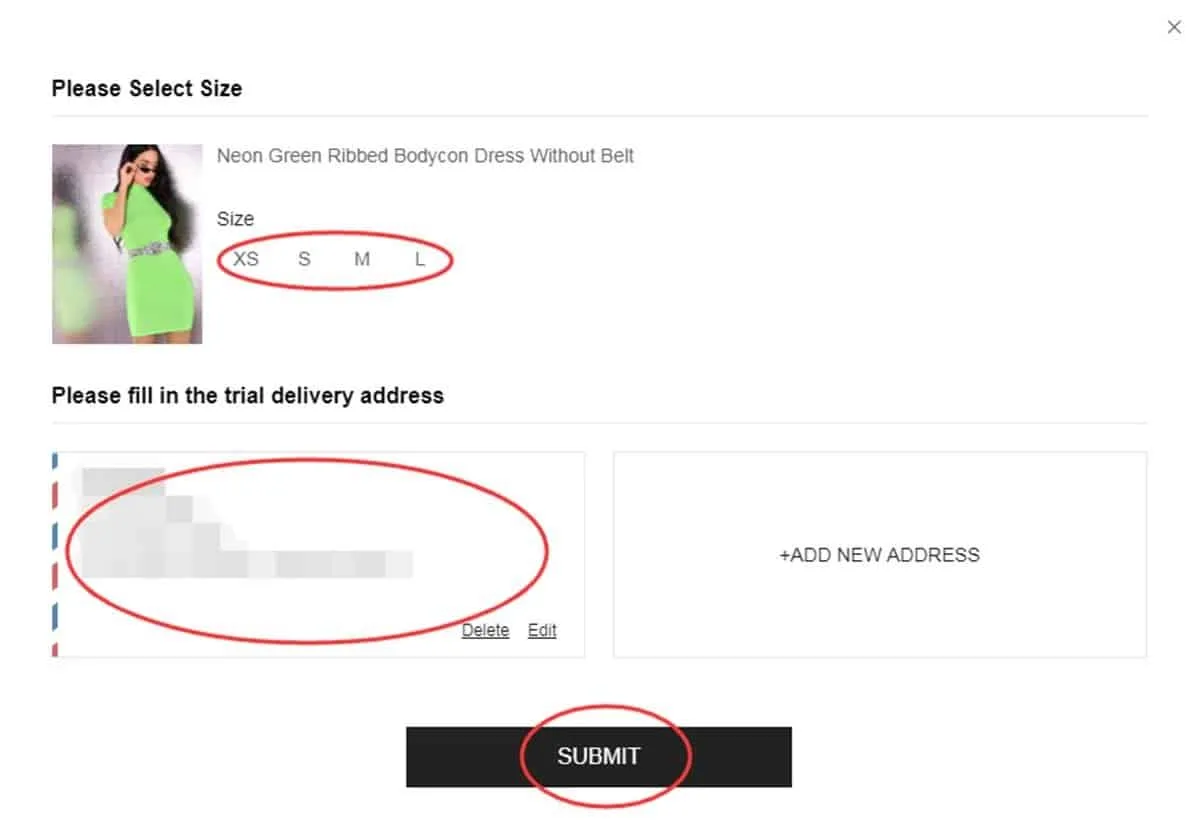
Double-checking sizes and where it will ship
Follow the system's verdicts
A final answer generally takes around a week to come through. Open “My Free Trial / My Applications” to see where things stand. An “Approved” tag means you've been chosen and your free parcel is on the way; “Failed” means the request wasn't accepted on this occasion.
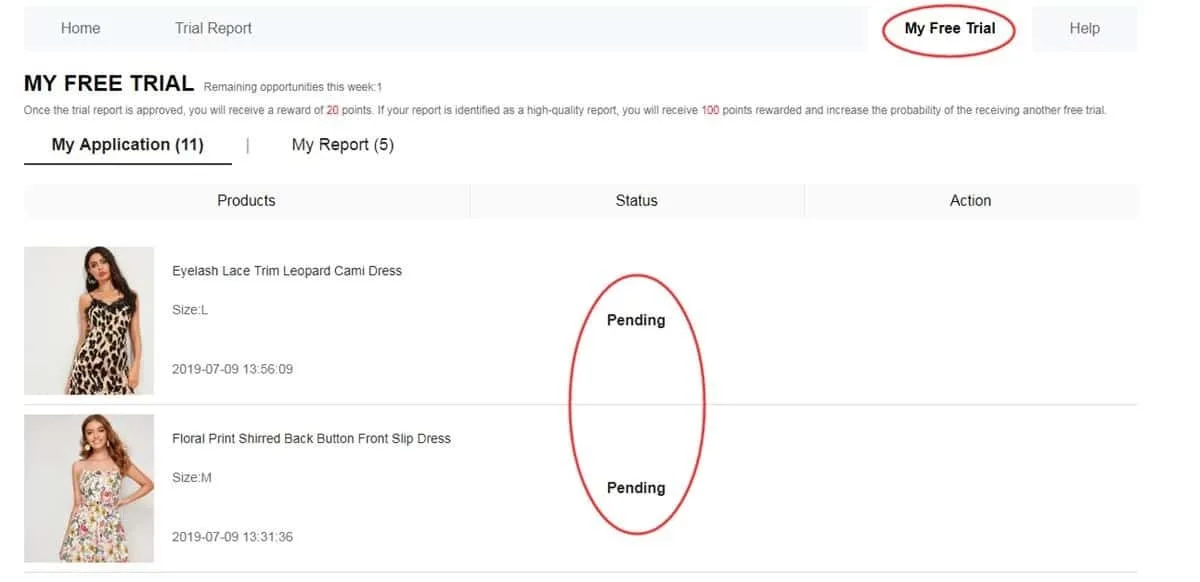
Internal panel for tracking approvals and rejections
Send in your review within 10 days
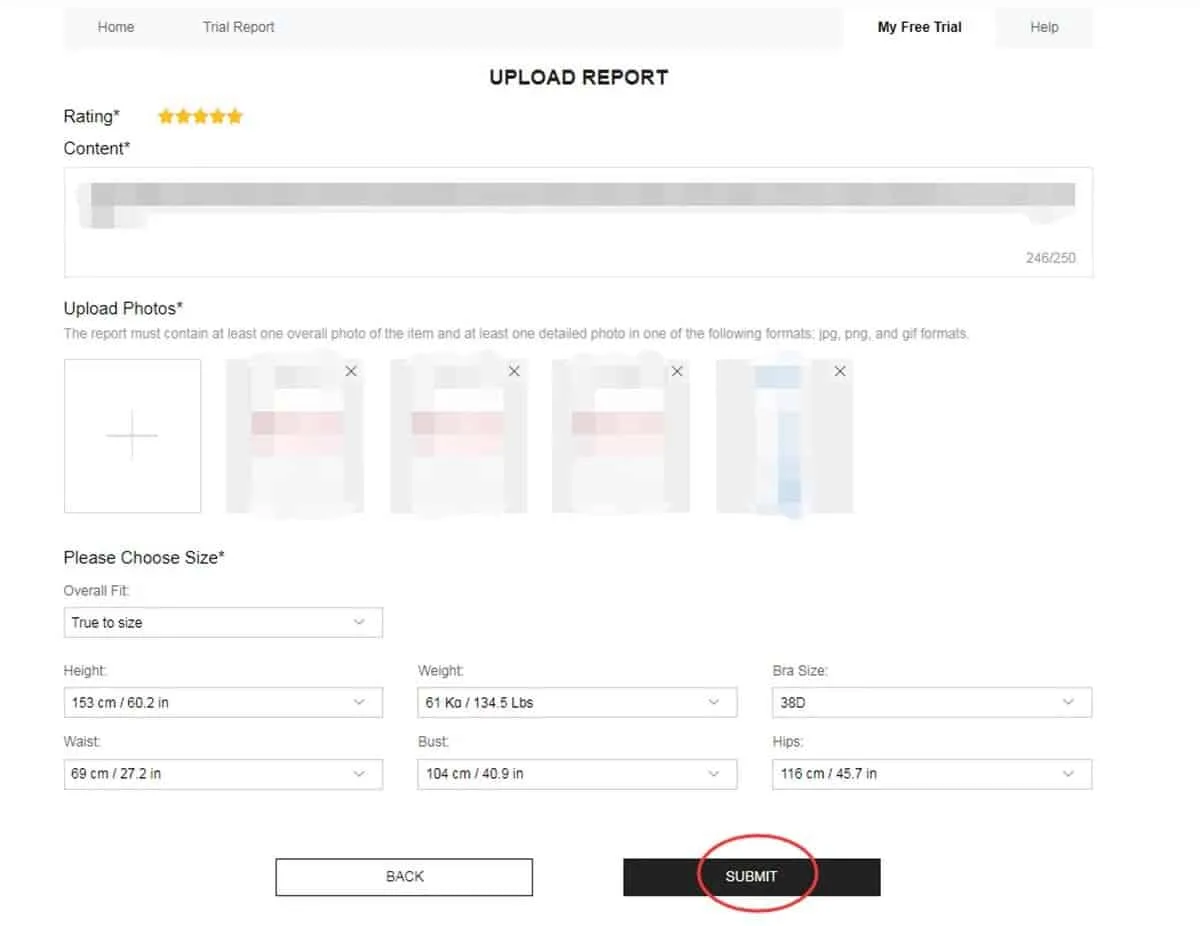
The moment your parcel arrives, put the piece to use and judge its quality, design, fit, fabric and how well it holds up. Write a rich review with crisp photos (one full-length shot plus two close-ups is a good idea). Send it via the matching button and watch its progress in “My Report”. Aim to finish before day 10.
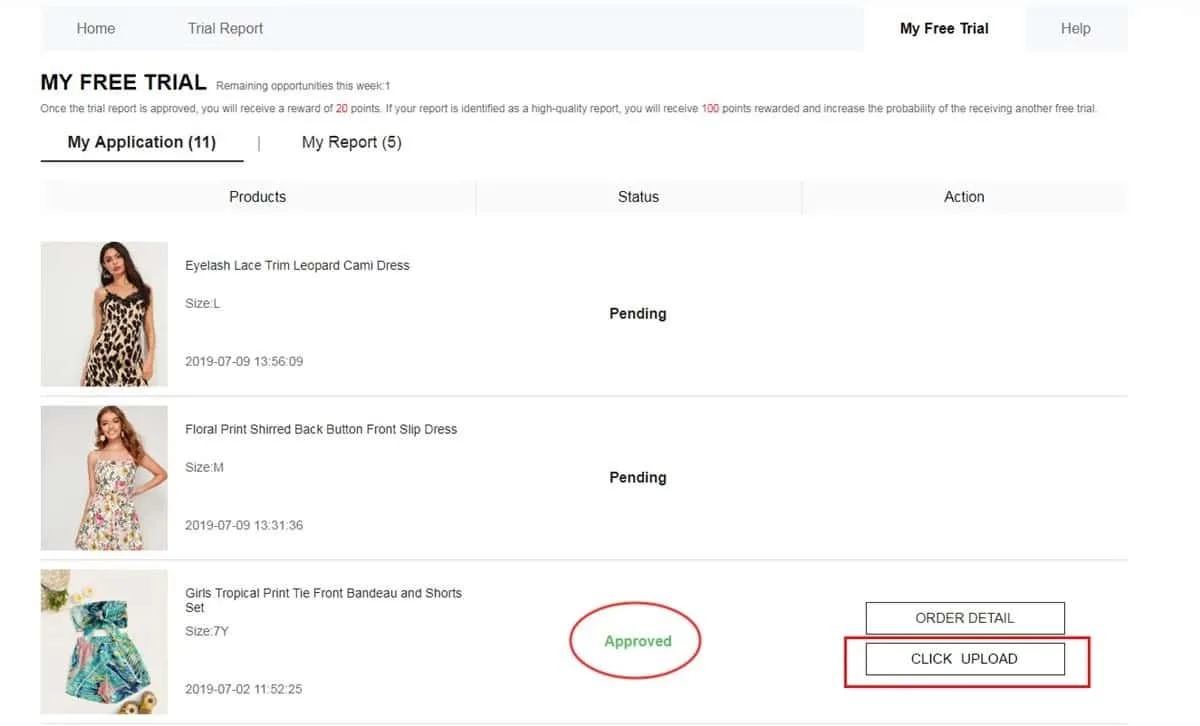
Official space for uploading written reviews and photos
Visit My Report and the points system
Once your review is sent, head over to My Report to confirm it was logged. An approved review typically earns 20 points. Should the system label it a “High-Quality Report”, a further 100 points come your way. These points don't secure future approvals; they simply reflect your history as a tester.
Panel showing your report status and the rewards you've collected
Rework your report if it reads Failed
Should your report's status switch to Failed, the rules generally grant one extra chance to revise it. Inside My Report, look for the Rewrite option. Use it to strengthen your text (quality, style, fit, fabric and finish), swap blurry photos and resend it before the deadline. Never leave a declined report as it is, since that can weigh on your future selections.
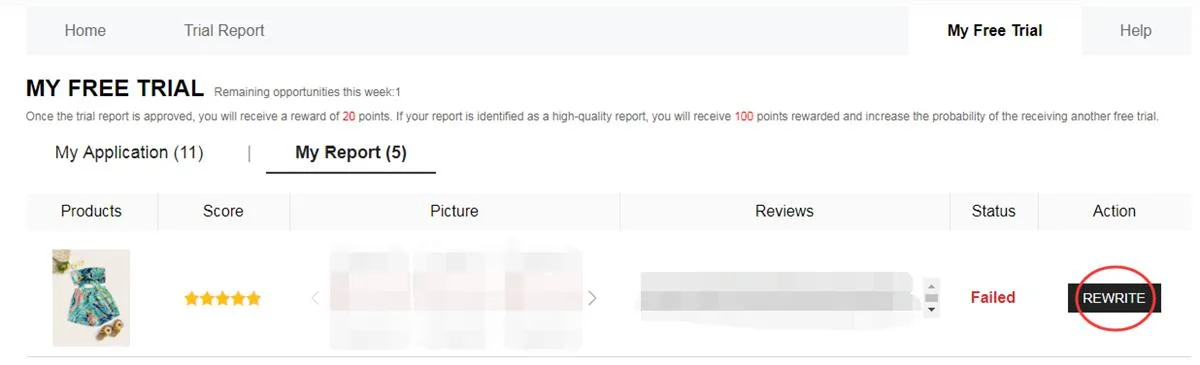
My Report screen showing Failed status and the Rewrite option for resubmitting
How to Shape a Review That Counts:
To satisfy the moderation filters, winning reviews tend to include:
Rewards System: Each approved review typically adds 20 points to your account. Earn the “High-Quality Report” label and 100 extra points arrive for your shopping.
Habits That Quietly Hurt Your Chances
Steer clear of these missteps to keep your internal profile in good shape:
❌ Letting your account profile go stale or leaving out your body measurements.
❌ Giving a shipping address outside the geographic region of the active store.
❌ Applying once the weekly campaigns are already underway.
❌ Sending bland, very short texts with no descriptive detail or real photos.
❌ Letting the 10-day window for your required report pass.
❌ Ignoring a Failed report instead of using Rewrite when the system offers it.
❌ Disappearing from the app for long stretches and coming back only for perks.
Testers who get picked more often tend to share a routine: a full profile, requests sent the instant weekly windows open, a confirmed address and rich reviews with genuine photos delivered on time.
— Camellora editorial tip
Key Conditions Worth Knowing
• A cap of 3 attempts per weekly cycle (unused spots never stack up).
• Your shipping address has to match the region of the active web store's country exactly.
• Standard shipping is paid for by the company, although customs fees can apply depending on the destination country.
• Every review has to be sent within 10 days of your parcel arriving.
• When a review reads Failed, an extra chance (Rewrite) to fix it is usually offered.
• False details or running several accounts on one device can lead to a permanent ban.
• Late or missing feedback weighs directly on your odds in upcoming selections.
Frequently Asked Questions (FAQ)
Do I pay anything to have the pieces shipped?
No, the platform takes care of all regular shipping costs. Testers just need to keep in mind any customs fees or local regulations.
How many catalog pieces can I request at once?
You may apply for up to 3 different pieces in each weekly round. Credits you don't use expire and won't carry into the next cycle.
What if my review isn't accepted?
Your My Report status might read Failed. Usually, the Rewrite option is offered so you can fix the text and photos before sending again. Check the content and image guidelines before you resubmit.
Must I send the pieces back after reviewing?
No. Under the usual program rules, the pieces you receive stay with you once your review is sent and validated. Read each campaign's own terms with care.
Sought-after pieces fill up fast. Testers with steady results check the dashboard as each campaign opens, lock in their choices quickly and send — or fix — their reviews within the deadline.
Visit the Official Free Trial Center Dashboard
See what's on offer this week, apply in the right sequence and follow every step.
You'll be safely taken to the platform's official trial space.
Reference source and technical support: Shein Free Trial Help Center


